2026-02-08
Reinforcement Learning with Unreal Learning Agents
I finished the reinforcement learning tutorial using Unreal's Learning Agents plugin some time ago. It is a great tutorial if you are looking for an introduction to reinforcement learning with the PPO algorithm and this post is for people who have completed it or are interested in doing the tutorial. When I finished the first part, it was really cool seeing the cars learning how to drive on a track they had never been on before. But I didn't really understand much about the underlying mechanism, PPO, encoder, decoder, policy, critic and so on.
My interest in this just grew as I started reading the Reinforcement Learning bible by Richard S. Sutton and Andrew G. Barto and I decided to revisit the same tutorial to understand what is going on under the hood. The book is freely available here and highly recommended. While doing some reading I bumped into a debugging tool called TensorBoard, the standard for debugging artificial neural networks. Honestly it gave me the same feeling I had when I first learned about proper debuggers almost 2 decades ago.
First you need to install TensorBoard specifically for the Python environment that ships with Unreal Editor. I really like that Unreal comes with its own Python Environment, unlike Unity. It is easier to start and I personally hate installing libraries without knowing what they are for.
pip -m install tensorboard
To be able to use TensorBoard with Unreal Editor, you also need to enable it in Trainer Training Settings in your BP_SportsCarManager blueprint.
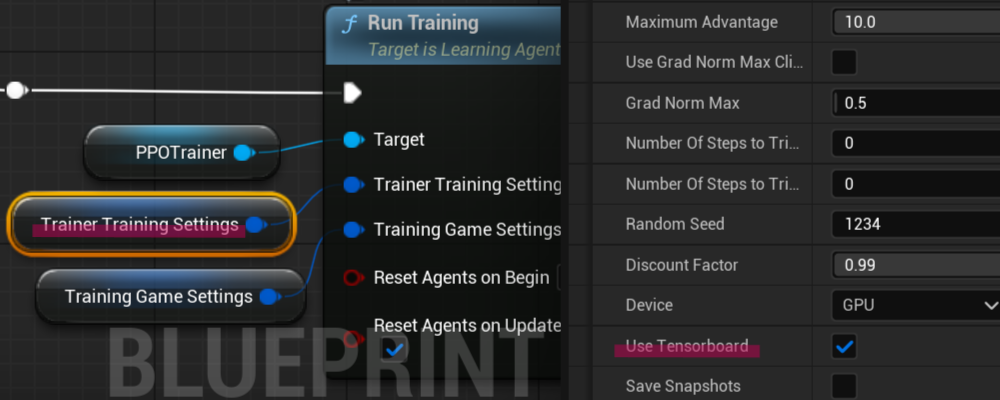
Even though I successfully installed TensorBoard, I got the following warning when I started the simulation.
LogLearning: Display: Subprocess: Warning: Failed to Load TensorBoard: No module named 'tensorboard'. Please add manually to site-packages.
LogLearning: Display: Subprocess:         "UseTensorBoard": false,
Since Unreal logs are really crappy, it took me some time to figure this out. I needed to add this path
C:/Program Files/Epic Games/UE_5.5/Engine/Binaries/ThirdParty/Python3/Win64/Lib/site-packages
to the Additional Paths list under Edit>Project Settings>Plugins>Python in Unreal Editor.
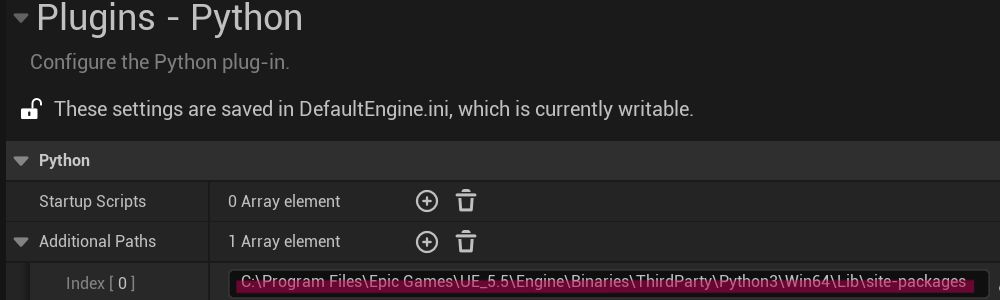
After adding the path to the list, I got this log which means that logging is active.
LogLearning: Display: Subprocess: "UseTensorBoard": true,
And then finally to see the visualized data, you need to run TensorBoard. Go to C:/Program Files/Epic Games/UE_5.5/Engine/Binaries/ThirdParty/Python3/Win64/Scripts and you should have tensorboard.exe there. If not that means you did not install it properly. You can do it by running the command below.
tensorboard.exe --logdir="[YourProjectPath]/Intermediate/LearningAgents/TensorBoard/runs"
If it starts successfully, you should see a log like this
TensorBoard 2.20.0 at http://localhost:6006/ (Press CTRL+C to quit)
The Address is where you can see the visualized data, just open your browser and paste the address.
You need to run your simulation for a while to see some data in TensorBoard.
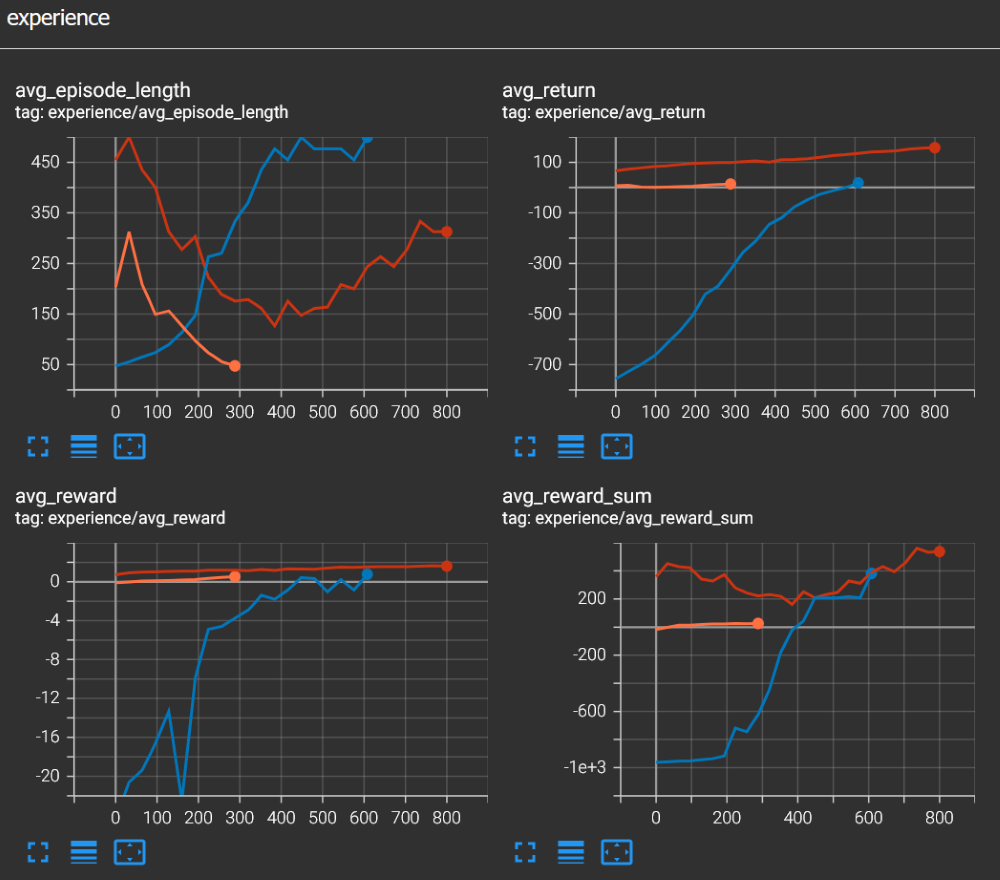
The TensorBoard visualizations were immediately intuitive, likely because I had been diving into the theory behind reward functions. It was a satisfying moment where the practical data perfectly aligned with the concepts I'd been learning. I just want to write down the definitions of the metrics I saw in TensorBoard.
Episode: A complete sequence of interactions from the starting state until a terminal state is reached (e.g., the car completes a lap or crashes).
Average Reward: The mean reward received by the agent per individual time step.
Average Return: The average total reward accumulated over the course of an episode, often used to gauge the overall performance of the policy.
Average Reward Sum: In the context of Unreal's Learning Agents, this represents the total reward an agent receives during an episode, averaged across all active agents in the training batch.
Now we can see what is going on inside our car's brain, thanks to TensorBoard. Now it is time to play around with rewards. I'll write this in more detail in another post but basically rewards are how we communicate with the agent. Rewards can be either positive or negative, negative rewards are like punishment. Rewards are set in BP_SportsCarTrainingEnv blueprint. We can see in the image below that when the car moves along the spline, it is rewarded by 1.0 and when the car gets further away from the spline it is punished by -10.0. So in this example being close to the spline is ten times more important than moving along it. You can see the data from two different runs and how they converge similarly. The car agent drives decently after 2000 steps.
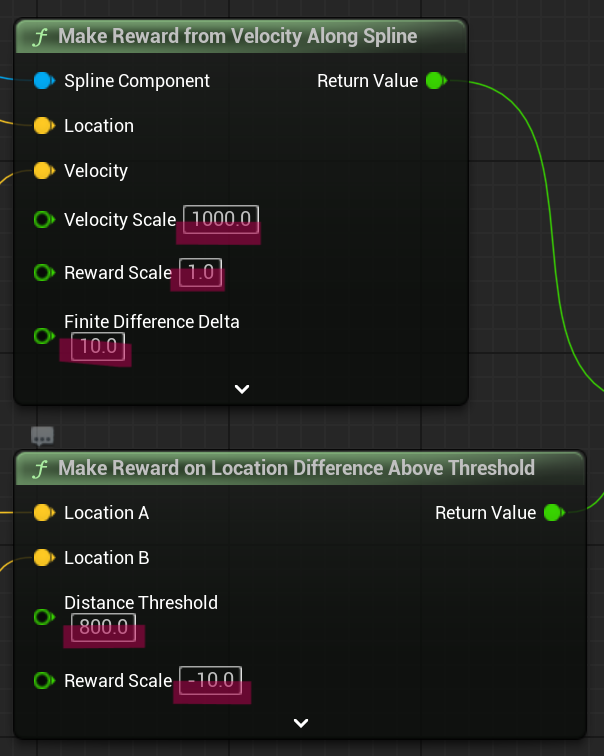
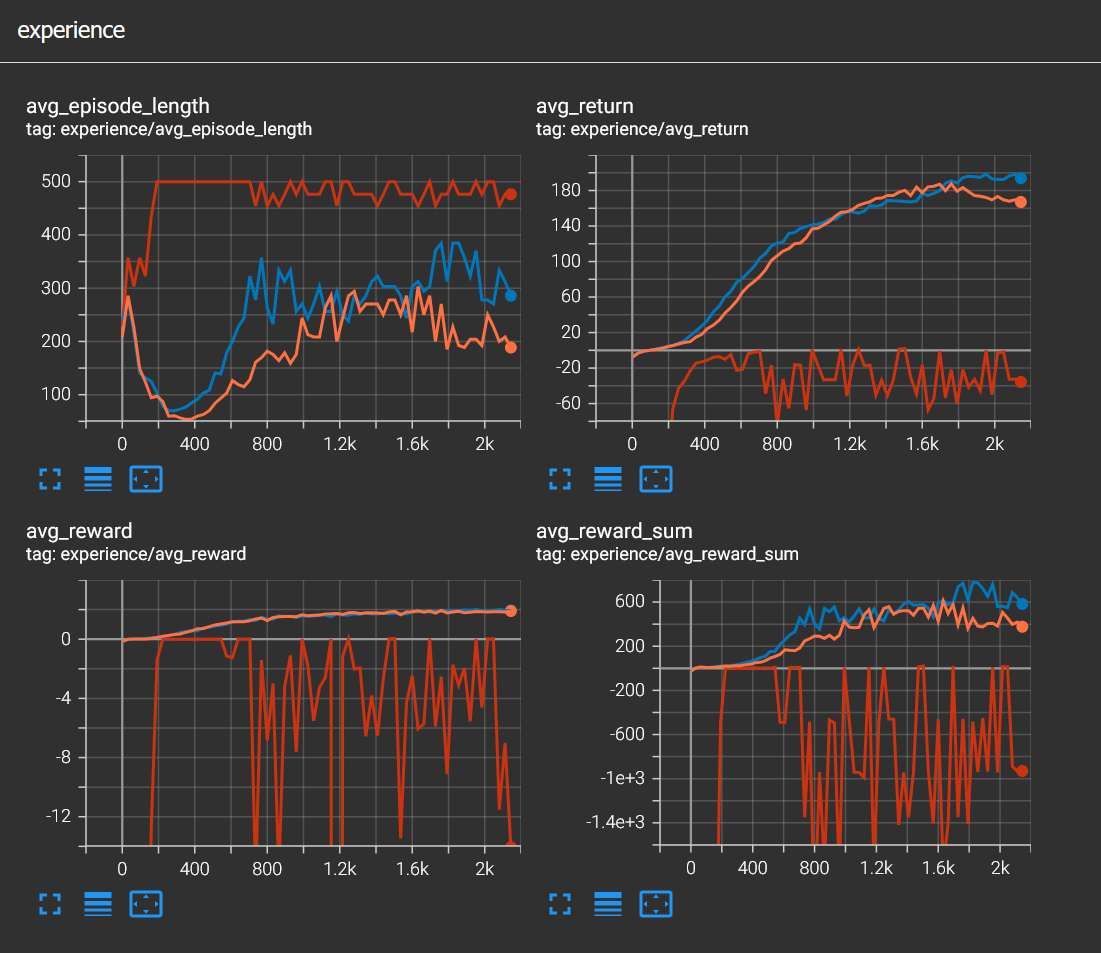
Let's see how choosing a bad reward function affects the learning process. This is also called reward shaping. I just changed the negative reward to -10000.0. Now it is 10000 times more important to be close to the spline than moving along it. What this causes is an agent that is too afraid to move and since RL is about maximizing the reward, not barely moving at all results in a higher reward. If you observe the red line, you can see it never converges, stays well below 0.
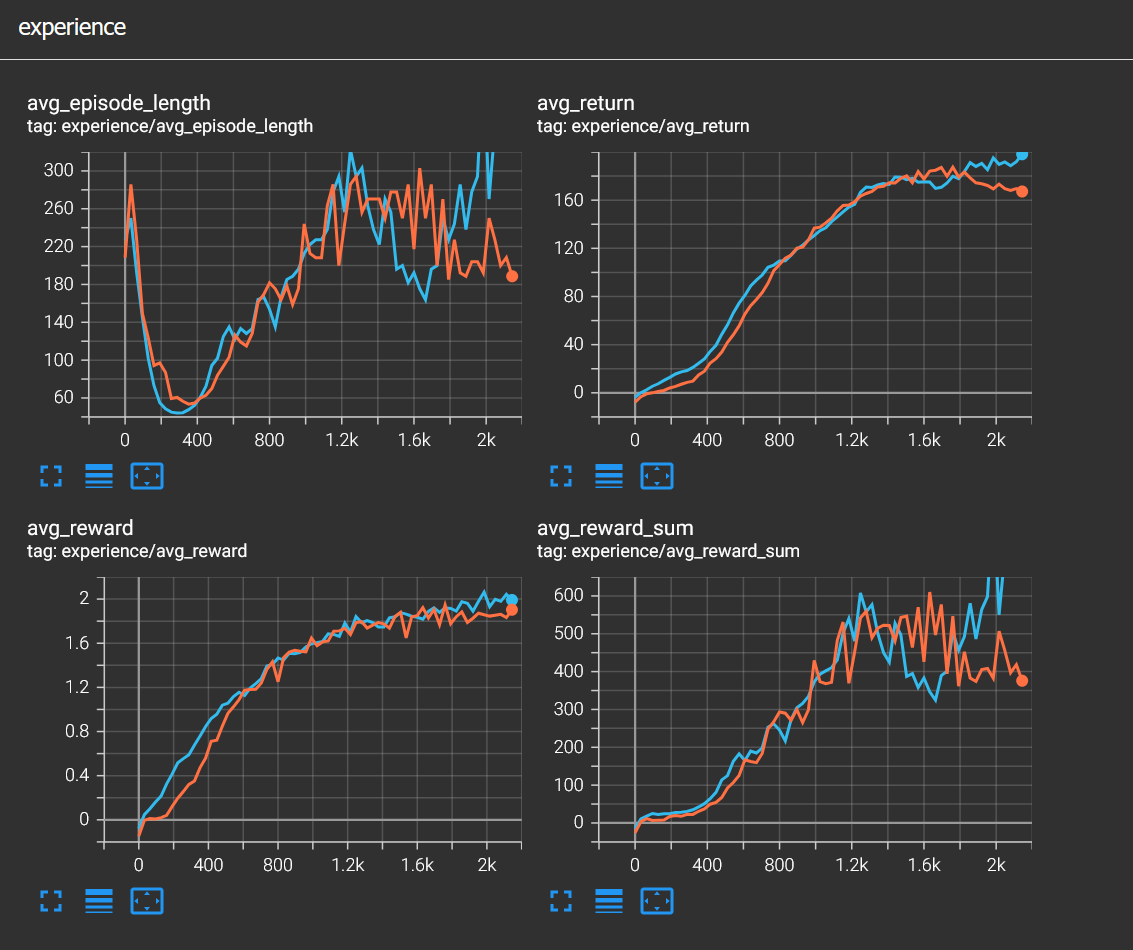
And lastly I tried zero punishment for not staying close to the spline. Surprisingly the agent still learned to drive decently, I'd say even faster. I think this one shows that negative rewards in this simulation are not strictly necessary.
This is just the tip of the iceberg when it comes to reinforcement learning. It is really different from the other two main machine learning paradigms, namely supervised and unsupervised learning. In supervised learning we have labeled data, in unsupervised learning we have unlabeled data but in reinforcement learning we have neither. We just have an agent that interacts with an environment and learns from its mistakes. But we also affect the agent by designing a reward function. I think this makes reinforcement learning both more interesting and also slightly difficult.
You can download this project from using this link.
